
A Digital SC Caste Certificate is useful when you need to keep, download or submit your Scheduled Caste certificate online. However, a digital file should come from an authorised government system or issuing authority. Simply scanning or editing a paper certificate does not create a new digital certificate.
What is a Digital SC Caste Certificate?
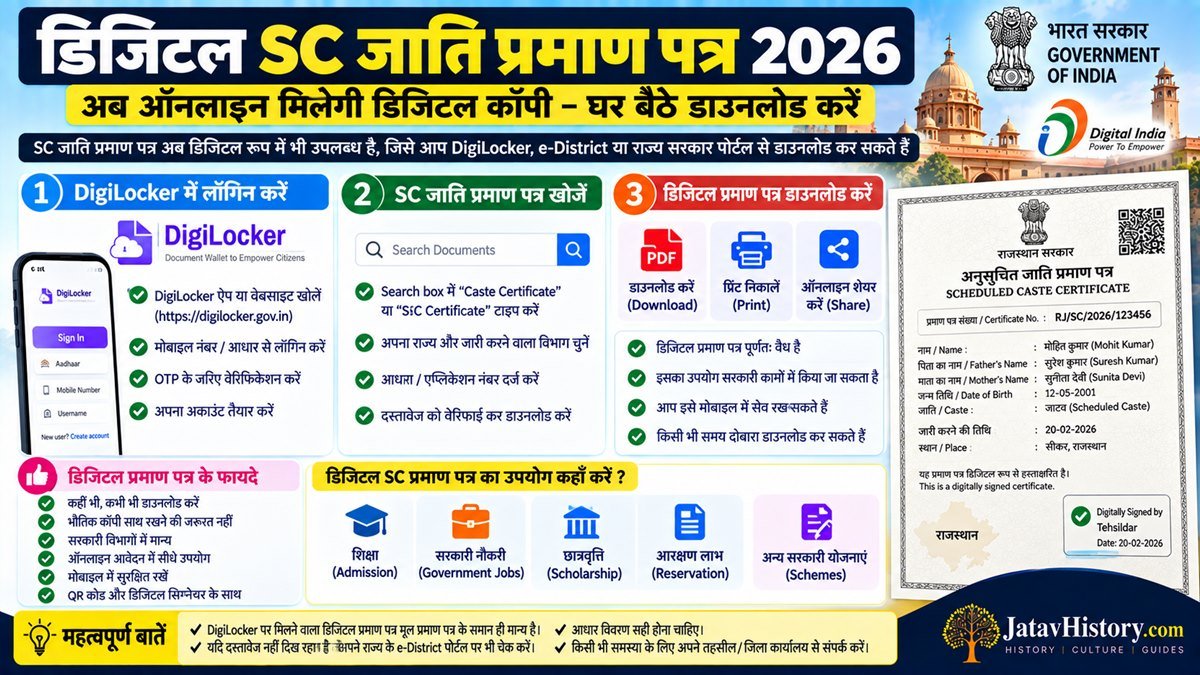
A Digital SC Caste Certificate is an electronic version of an SC caste certificate that is issued, stored or made available through an authorised government system.
Depending on the State or issuing authority, the certificate may be available as a downloadable PDF, an electronically issued certificate or through a digital document platform.
Can SC Caste Certificate Be Downloaded Online?
Yes, an SC caste certificate can be downloaded online where the concerned State or Union Territory provides an online certificate download facility.
Usually, the applicant needs details such as an application number, certificate number, acknowledgement number or other information requested by the issuing portal.
The exact process depends on where the certificate was issued. Therefore, there is no single download page that works for every State in India.
How to Download Digital SC Caste Certificate Online
If your State provides online certificate services, the general process can be similar to the following:
- Open the official caste certificate or citizen service portal of your State or Union Territory.
- Look for options such as Certificate Download, Download Certificate, Print Certificate or Certificate Services.
- Enter the application number, certificate number or other requested reference details.
- Complete OTP or other verification if the portal asks for it.
- Check the certificate details shown on the screen.
- Download the certificate PDF or use the available print option.
- Keep a copy of the certificate safely for future use.
Digital SC Caste Certificate Through DigiLocker
DigiLocker is a Government of India digital document platform developed under the Digital India programme. It allows citizens to access, store, share and verify authentic digital documents issued by participating organisations.
Caste Certificate is also listed among the documents available through DigiLocker, although availability depends on the concerned issuing department or State.
If your caste certificate issuer is available on DigiLocker, you may be able to fetch the document after signing in and providing the required details.
How to Get Caste Certificate in DigiLocker
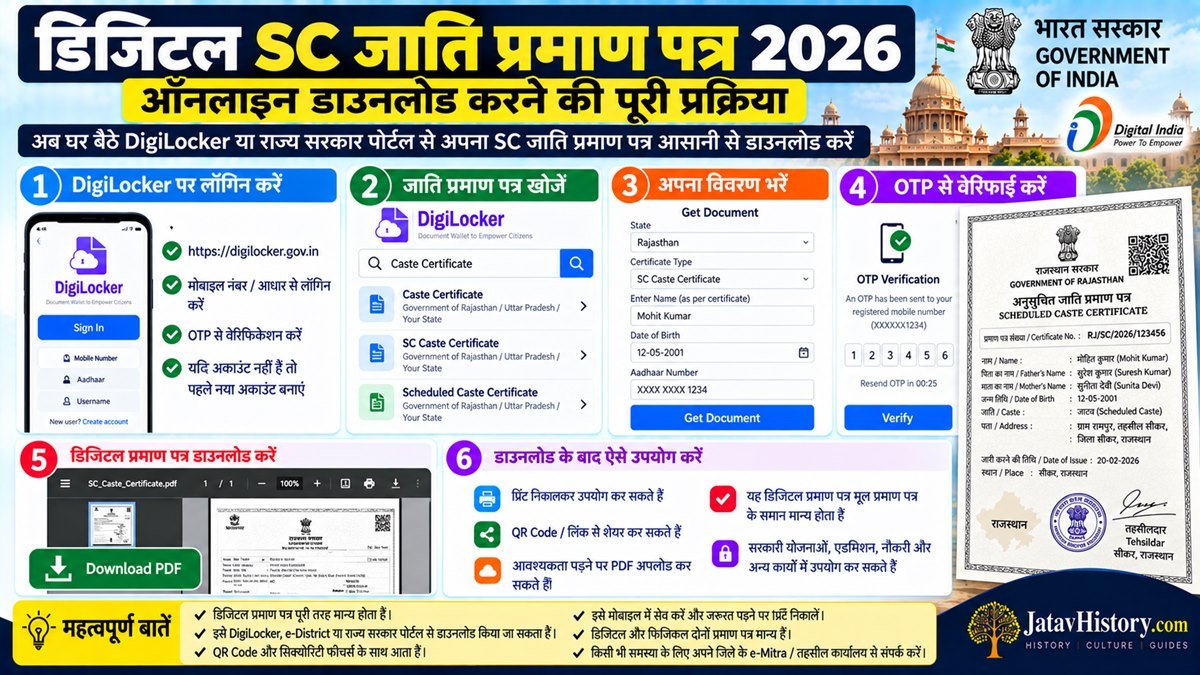
- Open the official DigiLocker website or app.
- Sign in to your DigiLocker account.
- Open the section for government documents or search for the relevant certificate.
- Select the concerned issuing organisation if your State or department is available.
- Enter the details requested by DigiLocker.
- Fetch the available document into your DigiLocker account.
DigiLocker itself recommends the process of registering, verifying the account and then fetching available documents. Its platform is designed for access, sharing and verification of digital documents.
How to Verify a Digital SC Caste Certificate
Verification should be done through the official issuing authority or an authorised digital verification system.
Before accepting or submitting a certificate, check:
- Applicant's name
- Name of the caste
- Certificate number or reference number
- Date of issue
- Issuing authority
- State or Union Territory mentioned on the certificate
- QR code, digital signature or verification facility, if provided
- Whether the details match the original government record
Digital Certificate vs Scanned Copy
A scanned copy and a digitally issued certificate are not necessarily the same thing.
| Point | Scanned Copy | Digital Certificate |
|---|---|---|
| Source | Scan or photo of a paper certificate | Issued or provided through an authorised digital system |
| Verification | May require checking the original | May provide an online verification mechanism |
| Format | Usually image or PDF scan | May be an electronically issued PDF or digital document |
| Use | Depends on the organisation | Depends on the issuing system and receiving organisation |
How to Check SC Caste Certificate Number
The certificate number is generally printed on the certificate issued by the competent authority. Its position and format can differ between States and issuing systems.
If you are asked to enter the certificate number for online verification, copy it exactly as printed on the certificate. Do not confuse the certificate number with an application number or acknowledgement number.
What If the Digital Certificate Is Not Available?
Older certificates may not always be available for direct online download. In such cases, check the official service portal or contact the authority that issued the certificate.
Do not download an editable caste certificate template from an unknown website and treat it as an official certificate.
Using Digital SC Certificate for Jobs
A digital caste certificate may be requested during online recruitment or document submission. However, the receiving organisation decides what documents it accepts at each stage.
Some recruitment processes may ask candidates to produce the original certificate during document verification even if a digital copy was uploaded during the application process.
Therefore, always read the latest recruitment notification before submitting a digital SC certificate.
Using Digital SC Certificate for College Admission
Colleges, universities and scholarship authorities may ask for caste certificates during admission or verification.
Whether a downloaded PDF or digital document is accepted depends on the instructions of the particular institution. If the institution asks for an original certificate, keep the original available.
Common Problems With Digital SC Caste Certificate
- Certificate number is not recognised by the portal.
- Application number and certificate number are confused.
- Old certificate is not available for online download.
- Mobile number is not linked with the application.
- Certificate details do not match the government record.
- DigiLocker does not show the certificate because the concerned issuer is not available or the document cannot be fetched.
- The receiving organisation has a different document requirement.
Important Tips Before Using a Digital SC Certificate
- Download the certificate only from an official or authorised source.
- Check your name and caste spelling carefully.
- Keep the certificate number safely recorded.
- Keep the original certificate where applicable.
- Do not edit the PDF or certificate details.
- Use official verification facilities whenever available.
- Follow the document instructions of the job, admission or service.
More SC Caste Certificate Guides
Frequently Asked Questions
Can I download an SC Caste Certificate online?
Yes, if the concerned State or Union Territory provides an online download facility. Use the official certificate portal and enter the required application or certificate details.
Can I get an SC Caste Certificate from DigiLocker?
Caste Certificate is available as a document category on DigiLocker, but actual availability depends on whether the concerned issuing organisation provides the document through DigiLocker.
How can I verify a Digital SC Caste Certificate?
Use the official verification facility provided by the issuing authority or an authorised digital document platform. Check the certificate number and other details carefully.
Is a scanned copy the same as a Digital SC Certificate?
No. A scanned copy is generally a digital copy of a paper document. A digitally issued certificate comes through an authorised issuing system.
Is a Digital SC Caste Certificate accepted everywhere?
Acceptance depends on the organisation and purpose. Follow the instructions of the particular job, admission, scholarship or government service.
What should I do if my certificate cannot be downloaded?
Check the official certificate portal and contact the issuing authority if necessary. Older certificates may not always be available for direct online download.
Official Sources
- DigiLocker – Government of India digital document platform for accessing, sharing and verifying digital documents.
- DigiLocker Verification – Official digital document verification service.
- National Government Services Portal – Government service information.
- Department of Personnel & Training (DoPT) – Government of India guidance relating to SC/ST certificates for Central Government appointments.
For State-specific certificate applications and verification, use the official portal of the concerned State or Union Territory.

Written by Himanshu Singh
Writer and researcher at JatavHistory, creating simple guides on government certificates, history and public information.